We know that it is vital for you to understand where each of your tickets is at in the creation process. You will receive an email each time a response to a ticket/request is made, and while email is great, they can sometimes be missed/overlooked or flagged as spam. If you need to check your ticket status, follow these steps:
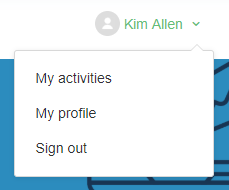
Step 1: Here in the Marketing Help Center scroll to the top to find your name.

Step 2: Click on the upside-down arrow next to your name to reveal the drop downs, My activities, My profile, Sign out
Step 3: Select My Activities
Step 4: You will be redirected to the My Requests page

On this page you will see the status of all of your tickets allowing you to know if a ticket is open, pending or solved. In addition, next to the “search requests” bar you can select a status from the drop down. It auto defaults to “any” request, but you can use this to search open tickets, anything that is awaiting your reply, or solved requests.